---
title: "Responsive Web Design and Mobile First: 5 basic techniques"
description: Knowing how to build a responsive design is mandatory for web developers. Nowadays there are so many different screen sizes, and we need our sites to adapt.
image: https://blog.avenuecode.com/hubfs/Images/Blog/responsive-web-design.jpg
---
[AvenueCode.com](https://avenuecode.com) [News](https://avenuecode.com/news) [Contact](https://avenuecode.com/contact)
[](https://blog.avenuecode.com/?hsLang=en-us) *menu*
- Technology
[Cloud](https://blog.avenuecode.com/blog/topic/cloud?hsLang=en-us) [Delivery Infrastructure](https://blog.avenuecode.com/blog/topic/delivery-infrastructure?hsLang=en-us) [Web Experience](https://blog.avenuecode.com/blog/topic/web-experience?hsLang=en-us) [Agile Mindset](https://blog.avenuecode.com/blog/topic/agile-mindset?hsLang=en-us) [Quality First](https://blog.avenuecode.com/blog/topic/quality-first?hsLang=en-us)
[Design](https://blog.avenuecode.com/blog/topic/design?hsLang=en-us) [Solution Architecture](https://blog.avenuecode.com/blog/topic/solution-architecture?hsLang=en-us) [Data & ML](https://blog.avenuecode.com/blog/topic/data-and-machine-learning?hsLang=en-us) [Mobile Experience](https://blog.avenuecode.com/blog/topic/mobile-experience?hsLang=en-us)
- [Whitepapers](https://blog.avenuecode.com/blog/topic/whitepapers?hsLang=en-us)
- [Spotlight](https://blog.avenuecode.com/blog/topic/spotlight?hsLang=en-us)
- [Extraordinary Women in Tech](https://blog.avenuecode.com/blog/topic/extraordinary-women-in-tech?hsLang=en-us)
- [Avenue Code Culture](https://blog.avenuecode.com/blog/topic/avenue-code-culture?hsLang=en-us)
- [Cloud](https://blog.avenuecode.com/blog/topic/cloud?hsLang=en-us)
- [Design](https://blog.avenuecode.com/blog/topic/design?hsLang=en-us)
- [Delivery Infrastructure](https://blog.avenuecode.com/blog/topic/delivery-infrastructure?hsLang=en-us)
- [Solution Architecture](https://blog.avenuecode.com/blog/topic/solution-architecture?hsLang=en-us)
- [Web Experience](https://blog.avenuecode.com/blog/topic/web-experience?hsLang=en-us)
- [Data & ML](https://blog.avenuecode.com/blog/topic/data-and-machine-learning?hsLang=en-us)
- [Agile Mindset](https://blog.avenuecode.com/blog/topic/agile-mindset?hsLang=en-us)
- [Mobile Experience](https://blog.avenuecode.com/blog/topic/mobile-experience?hsLang=en-us)
- [Quality First](https://blog.avenuecode.com/blog/topic/quality-first?hsLang=en-us)
- [Whitepapers](https://blog.avenuecode.com/blog/topic/whitepapers?hsLang=en-us)
- [Spotlight](https://blog.avenuecode.com/blog/topic/spotlight?hsLang=en-us)
- [Extraordinary Women in Tech](https://blog.avenuecode.com/blog/topic/extraordinary-women-in-tech?hsLang=en-us)
- [Avenue Code Culture](https://blog.avenuecode.com/blog/topic/avenue-code-culture?hsLang=en-us)
# [Responsive Web Design and Mobile First: 5 basic techniques](https://blog.avenuecode.com/responsive-web-design-and-mobile-first-5-basic-technics)
- [Tweet](https://twitter.com/share)
*perm\_identity* [Lucas Estevão](https://blog.avenuecode.com/responsive-web-design-and-mobile-first-5-basic-technics/author/lucas-estev%C3%A3o?hsLang=en-us)
*schedule* 11/2/16 6:00 PM
> About a year and a half after reaching 1 billion active users, Facebook hit another milestone: over 1 billion active *mobile* users. Mashable, one of the biggest sources of content about social media, internet news, and digital innovation, published a [survey](http://mashable.com/2013/08/20/mobile-web-traffic/#EihgwfI3kkqS) stating that 17.4% of all web traffic comes from mobile devices. This survey was published in 2013, since which time the percentage has steadily crept upward yearly.
Social networks like Tumblr are changing features formerly found only on websites for desktop to mobile platforms, synchronizing both contexts. Another [study](http://mashable.com/2013/10/24/content-consumption-desktop-mobile/#EihgwfI3kkqS), also published by Mashable, shows that 65% of all time spent on social networks is from mobile devices.
According to a [2014 report](https://www-03.ibm.com/press/us/en/pressrelease/45515.wss) from IBM, *"for the first time, online traffic from mobile devices outpaced traditional PCs on Thanksgiving day"*; according to a [2015 study](https://www.comscore.com/Insights/Blog/Mobile-Internet-Usage-Skyrockets-in-Past-4-Years-to-Overtake-Desktop-as-Most-Used-Digital-Platform) from ComScore, mobile devices *"account for 60 percent of digital media time spent"*. Already in 2016, according to [this article](https://www.thinkwithgoogle.com/articles/mobile-retail-apps-sites-introduction.html), *"30% of all online shopping purchases now happen on mobile phones"*.
All of these articles point to the same fact: the reasons to apply the concept of responsive design are many, and they are only growing.
# Understanding the concepts
Developing websites (or any web application) with a flexible and adaptable layout and context, capable of responding to a large variety of screen resolutions, devices and contexts, is called Responsive Web Design.
Imagine the difference between a device whose screen is 320px wide and another device with a screen side of 1024px. The space left by the difference of size is too large to simply stretch the layout, adapting the content to the available space. Leaving a rough blank space is even worse. Clearly, this is a case for responsive design. Some techniques allow us to offer the final users a much better experience, adapting ourselves in a really significant way to each type of device.
## Mobile First
When planning for responsive design, we define the basis of the application design for a given screen size, and from there we can adapt the content progressively to different screen sizes, applying different design rules. These rules are directly linked to the size of the screen, since they may restrict certain features of the web site. For instance, displaying a heavy image gallery can provide a poor user experience on mobile devices.
Hiding or displaying sections of the web site, reducing the size of images or adjusting font size so that the page has no horizontal scrolling, and ensuring that no piece of the content is superimposed - or even exchanging a horizontal menu with a vertical selection box - all are examples of design rules that can be manipulated to allow the application to respond to available screen size. The impact to user experience cannot be overstated, especially on devices with smaller screens.
When we decide to apply this concept, we need to begin somewhere and therefore need to decide what the focus is. One option is to begin the planning by considering the restrictions of mobile devices. Mobile first, then, means that the basis of design as explained above, is defined for the smaller screen sizes found on mobile devices. In other words, begin by developing the application with an iPhone 4S (320 x 480) in mind. By focusing first on the limitations imposed by mobile devices, we can more easily develop adapted versions for larger screens, graduating to tablets, desktops, and even smart TV's. This is mobile first.
# Hands On
So how do we go about creating responsive design? Below we'll explore 5 basic techniques to implement responsive design, focused on mobile first. This article will stick to fairly basic methods.
### 1. Change the box-sizing
In an HTML page, each element is represented as a rectangular box, which is interpreted by the browser using the standard box model (CSS box model). This model determines the content of the space occupied by an element, which is to say, the ratio of the element and its content to its attributes of margin, padding and border.
The CSS property `box-sizing` is what defines how this box model will behave in relation to its size and spacing measures. The default of the browser is the `content-box`, which considers the original size (`width`, `height`, etc.), added to the spacings (`padding`, `margin`, etc).
But the way the `box-sizing: content-box` works is not intuitive. If we want an element to occupy `50%` of the screen with a border of `5px` and, therefore, define `width: 50%; border-width: 5px;` the result will be somewhat more complicated, because the final width of this element will be equal to `50%` of the screen width added to the `10px` edge. If the screen has `100px`, the result would be `60px` width for the element.
Therefore, it's important to make sure all the elements have their `box-sizing` as `border-box`, which will prevent the size of all properties from being added to the `width` defined for the element.
```
*, *:before, *:after {
-webkit-box-sizing: border-box;
-moz-box-sizing: border-box;
box-sizing: border-box;
}
```
### 2. Convert the typography
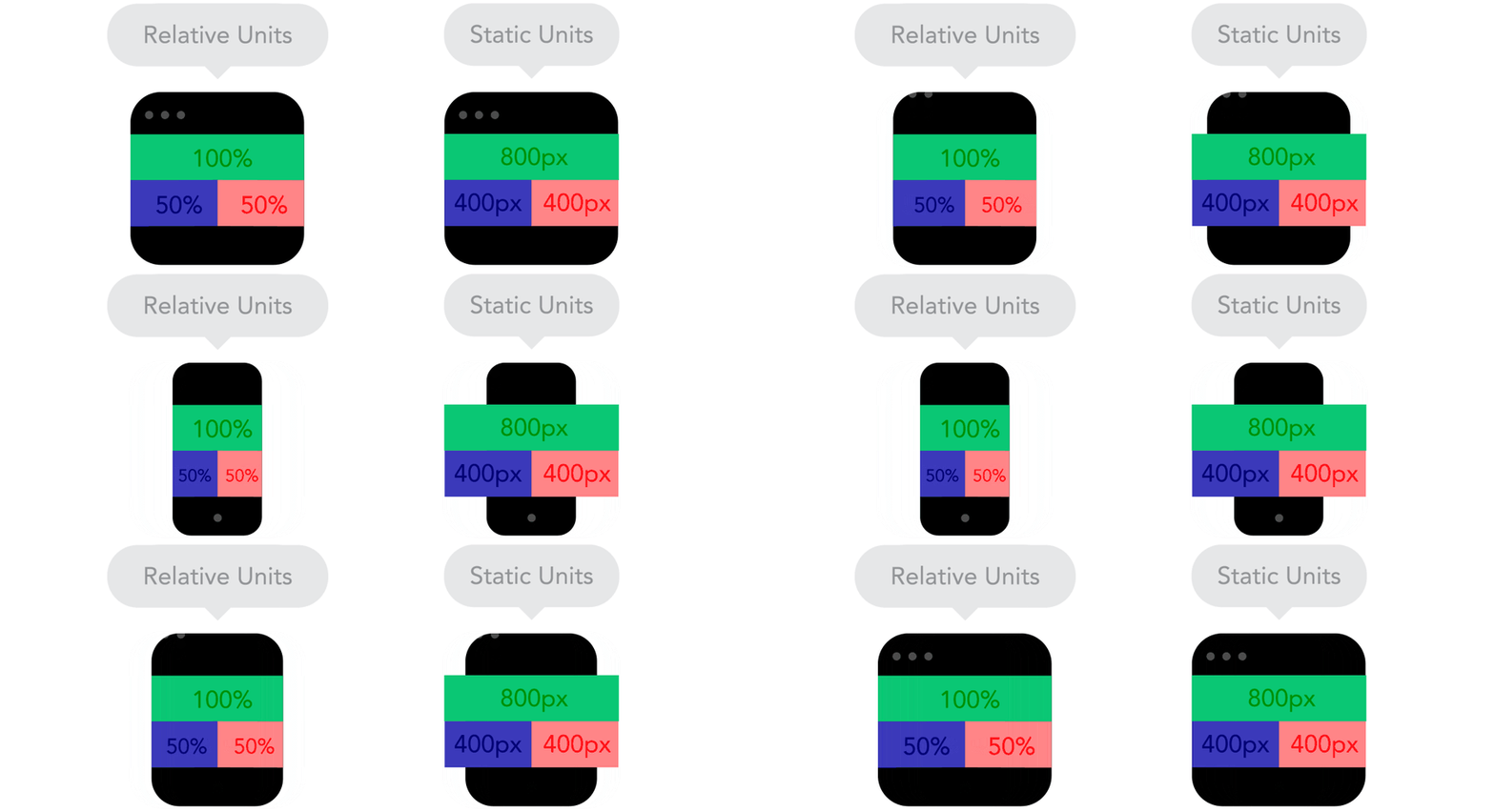
To get the result of a fluid layout, we need to use the relative measures (`%`, `em`, `rem`, `vw`, `vh`), which provide fluidity to the site when the screen size or font are changed. We use each of these units of measurement as follows:
- **PX:** absolute measure used for immutable values such as `background`, `text-shadow` and html `font-size`.
- **%:** classified as data type and not units of measure by the W3C specification. Used in containers (`section`, `article`, `div`), fluid grids, and images.
- **EM:** relative distance unit, calculated in relation to another unit of measure. Its value is relative to the size of the parent element font (i.e., an element with `font-size: 2em;` will be twice the size of the parent element source, whatever it is). This is used in `font-size`, `margin`, `padding`. Unlike percentage, the `em` is a fixed value like the pixel, but its value is calculated from the value of another element.
- **REM:** like the `em`, it is a relative distance unit. Its value is relative to `font-size` document's root (i.e., an element with `font-size: 2rem;` will have twice the font size of the document root element, which may be the `html` tag or the `body` tag, depending on the CSS rule that was applied). Also used in fonts, margins and paddings, `rem`doesn't work in some versions of Android and IE <9.
- **VIEWPORT UNITS (`vw`, `vh`, `vmin`, `vmax`):** used in containers, grids, images and even fonts. This is a truly flexible and adaptable unit. The `vh` is equal to one percent of the viewport (size of the browser screen) height. For instance, if the browser height is `640px`, `1vh` is equal to `6.4px` and, in the same way, if the viewport width is `320px`, `1vw` is equal to `3.2px`.
It is necessary to convert the typography following the specifications above. For instance, we will apply the `font-size`of `16px` in the body and adapt our fixed units using the following calc: **SIZE ÷ CONTEXT = RESULT**, as shown in the example below:
**Before:**
```
h1 { font-size: 24px; }
h1 span { font-size: 18px; }
```
**After:**
```
body { font-size: 16px; }
h1 { font-size: 1.5rem; }
/* 24 ÷ 16 = 1.5 */
h1 span { font-size: 1.125rem; }
/* 18 ÷ 16 = 1.125 */
```
****
### 3. Set the Viewport
The viewport is the screen visible area of the device, where the website is displayed. The viewport customization allows us to define the visible initial resolution of the website, and avoid its miniaturization.
```
```
In the below example I suggest a more complete configuration, disabling the zoom feature, and assuming that the user will never need this feature (use with caution).
```
```
### 4. Define Break Points
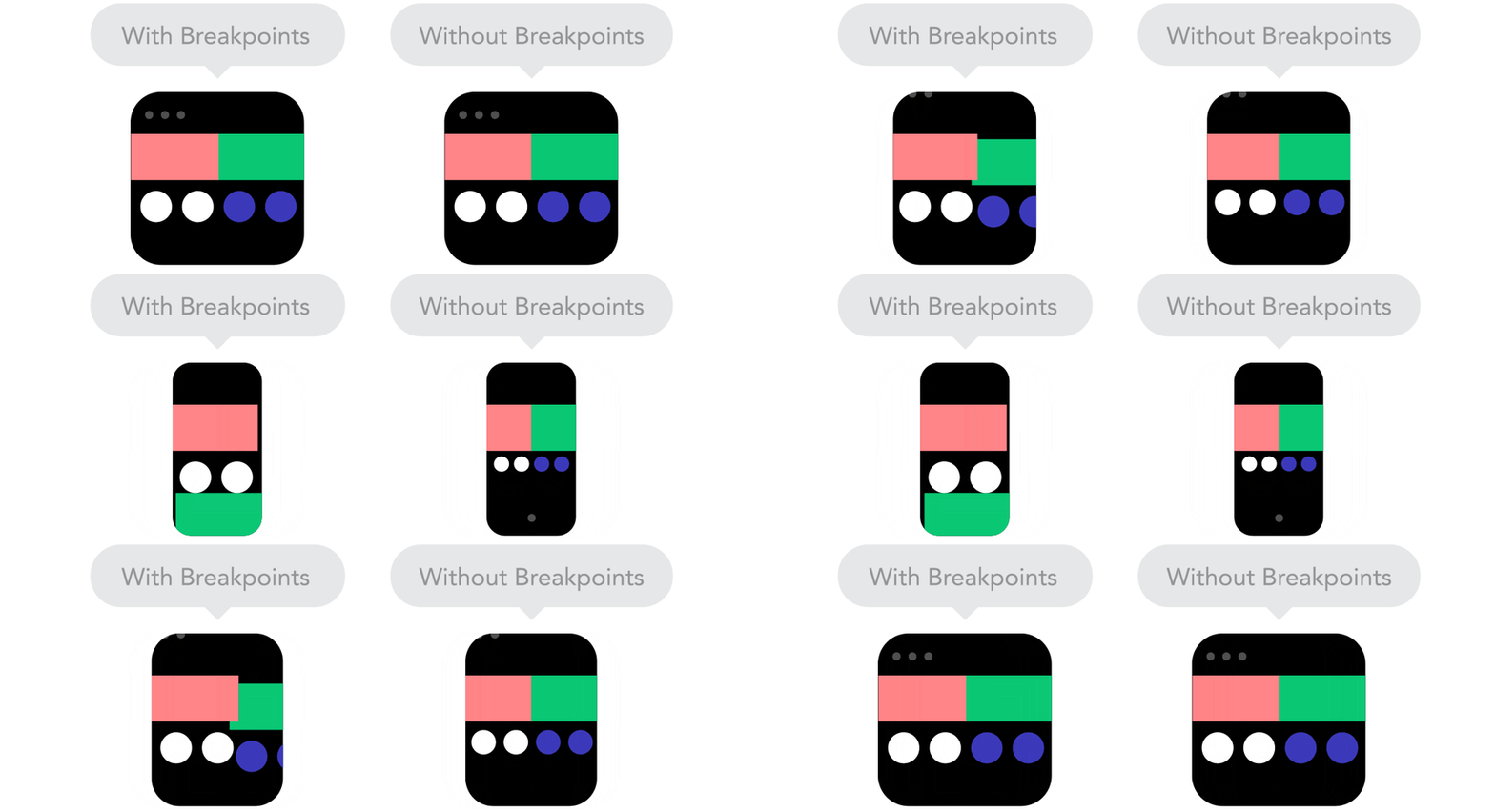
[Media Queries](https://www.w3.org/TR/css3-mediaqueries/) are conditional expressions to apply different CSS styles, depending on certain rules such as the viewport width. Through its use, we define points of considerable changes in the layout of the page. For instance, displaying a certain element only to devices with big screens, like a desktop.
```
/* Extra small devices (phones, less than 768px) */
/* No media query since this is the default in Bootstrap */
#banner { display: none; } /* banner not displayed */
/* Small devices (tablets, 768px and up) */
@media (min-width: 768px) { ... }
/* Medium devices (desktops, 992px and up) */
@media (min-width: 992px) { ... }
/* Large devices (large desktops, 1200px and up) */
@media (min-width: 1200px) {
#banner { display: block; } /* banner displayed only for desktops */
}
```
Beyond the size rules we saw above, we can also define rules for device orientation, screen aspect ratio, or even resolution, among others.
```
/* Devices on portrait mode */
@media all and (orientation:portrait) { ... }
/* Devices with screen size like 1280 horizontal pixels and 720 vertical pixels */
@media screen and (device-aspect-ratio: 16/9) { ... }
/* Devices with resolution greater than 300 dots per inch */
@media print and (min-resolution: 300dpi) { ... }
```
****
### 5. Use SVG for images
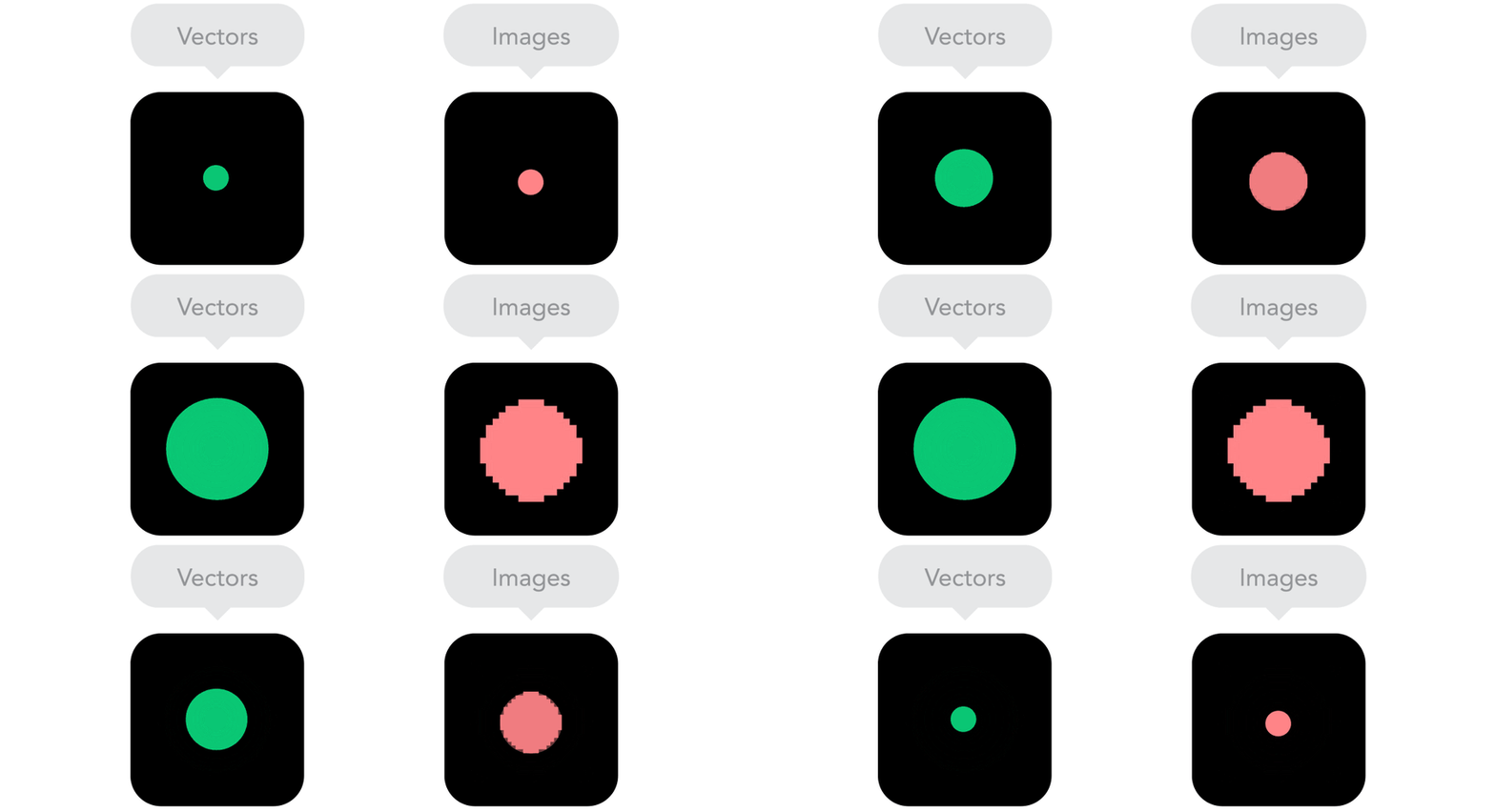
SVG stands for *Scalable Vector Graphics*. It is an XML language for describing in a vector shape drawings and two-dimensional graphics, either statically, dynamically or as an animation. We can incorporate SVG in the website responsively using the `object` tag in order to provide an image alternative to browsers that don't support SVG.
```
```
```
```
****
## Conclusion
These are just a handful of basic techniques, and there are plenty more! Some other techniques to develop responsive design focused on mobile first worth checking out are [user agent](http://www.johnfaulds.com.au/journal/responsive-images-with-expressionengine/), [HTML 5](https://www.html5rocks.com/en/tutorials/responsive/picture-element/) tags, [Responsive Navigation](https://css-tricks.com/convert-menu-to-dropdown/) and many others. My recommendation is to use one of these two CSS frameworks: [Bootstrap](http://getbootstrap.com/) or [Foundation](http://foundation.zurb.com/), and to take some time to read this informative article from [Smashing Magazine](https://www.smashingmagazine.com/2011/07/responsive-web-design-techniques-tools-and-design-strategies/).
Now it's up to you! Keep studying, keep practicing and if you find any cool technic to implement responsive design, come and share it with us!
---
[](https://www.facebook.com/lucasestevao) [](https://www.linkedin.com/in/lucasestevao)
### Author
# Lucas Estevão
Lucas Estevão is a UI Engineer and Consultant at Avenue Code. He is a longboarder, a kickboxer, a Brazilian jiu-jitsu newbie, a UI and Agile enthusiast, and a movie lover.
---
### Related Posts
### What are CSS Custom Properties
[READ MORE](https://blog.avenuecode.com/what-are-css-custom-properties?hsLang=en-us)
### How to Build Your Own Facial Recognition Web App
[READ MORE](https://blog.avenuecode.com/how-to-build-your-own-facial-recognition-web-app?hsLang=en-us)
### 4 Ways to Make Your Angular App Sustainable and Scalable
[READ MORE](https://blog.avenuecode.com/8-design-tips-to-make-your-angular-app-sustainable-and-scalable?hsLang=en-us)
### How to Build a Custom Component in VueJS
[READ MORE](https://blog.avenuecode.com/how-to-build-a-custom-component-in-vuejs?hsLang=en-us)
### Leave a Comment!
### Avenue Code Social
[](https://www.facebook.com/avenuecode)
[](https://twitter.com/AvenueCode)
[](https://www.linkedin.com/company/avenue-code)
### Newsletter
Want to stay on top of all tips and news from Avenue Code?
### Popular Snippets

### About Us
- [Who We Are](https://www.avenuecode.com/who-we-are)
- [What We Do](https://www.avenuecode.com/what-we-do)
- [Portfolio](https://www.avenuecode.com/portfolio)
- [Partners](https://www.avenuecode.com/partners)
- [News](https://www.avenuecode.com/news)
- [Events](https://www.avenuecode.com/events)
- [Blog](https://blog.avenuecode.com/)
- [Contact](https://www.avenuecode.com/contact)
### Our Offices
San Francisco
[+1 415 766 4178](tel:+553125161448) [ac.inquiries@avenuecode.com](mailto:brazil.info@avenuecode.com)
Belo Horizonte
[+55 31 2516 1448](tel:+553125161448) [brazil.info@avenuecode.com](mailto:brazil.info@avenuecode.com)
São Paulo
[+55 11 3205 3232](tel:+553125161448) [brazil.info@avenuecode.com](mailto:brazil.info@avenuecode.com)
### We're Hiring!
- [Belo Horizonte](https://www.avenuecode.com/who-we-are)
- [New York](https://www.avenuecode.com/what-we-do)
- [San Francisco](https://www.avenuecode.com/portfolio)
- [São Paulo](https://www.avenuecode.com/partners)
---
©2015 - 2017 Avenue Code
[](https://www.facebook.com/avenuecode) [](https://twitter.com/AvenueCode) [](https://www.linkedin.com/company/avenue-code) [](https://www.glassdoor.com/Overview/Working-at-Avenue-Code-EI_IE456173.11,22.htm) [](https://www.youtube.com/user/AvenueCodePlay)
Please enable JavaScript to view the [comments powered by Disqus.](http://disqus.com/?ref_noscript)
© 2026 Avenue Code
```json
{
"@context" : "https://schema.org",
"@type" : "BlogPosting",
"author" : {
"@type" : "Person",
"name" : "Lucas Estevão",
"url" : "https://blog.avenuecode.com/author/lucas-estevão"
},
"dateModified" : "2022-02-25T21:34:02.836Z",
"datePublished" : "2016-11-02T20:00:00.000Z",
"headline" : "Responsive Web Design and Mobile First: 5 basic techniques",
"image" : [ "https://blog.avenuecode.com/hubfs/Images/Blog/responsive-web-design.jpg" ],
"mainEntityOfPage" : {
"@id" : "https://blog.avenuecode.com/responsive-web-design-and-mobile-first-5-basic-technics",
"@type" : "WebPage"
},
"publisher" : {
"@type" : "Organization",
"logo" : {
"@type" : "ImageObject",
"url" : "https://blog.avenuecode.com/hubfs/Avenue%20Code%20New%20Logos%20-%202023/Avenue%20Code-primary%20versions_LOGO%20HORIZONTAL%20group%201-7.png"
},
"name" : "Avenue Code"
}
}
```